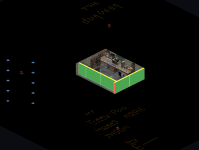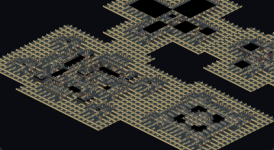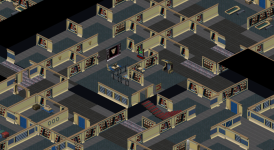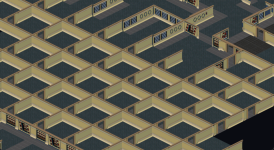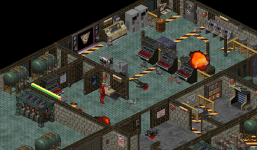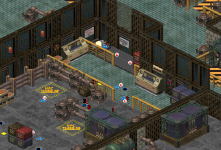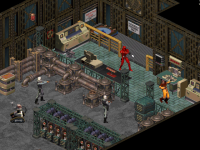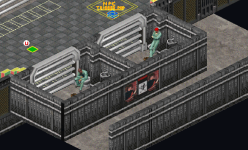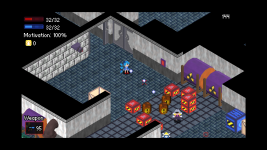
I'm Reverse Engineering Crusader because I'm still obsessed about the game

Link to the web app: https://maddoscientisto.github.io/Crusader-Map-Viewer/

Inspired by the great work Stauff did a few years ago and fueled by an unending obsession for anything Crusader I decided to start a new reverse engineering effort.

I got about 49% through it and in doing so I discovered and documented plenty, then I realized that I could further improve the work by using the already done work in ScummVM and Pentagram, that helped a bit, but the real treasure was finding the repository for Stauff's old work. Once I started from there and applied my notes, I started discovering a lot of interesting stuff.

I've been very interested in the cheat codes because for years there was a lot of misinformation on the net, especially on gamefaqs, and I couldn't get the Immortality cheat to work at all, a bit due to DOSBox catching the key combination and a bit because the information available was plainly wrong. For years I believed that the immortality cheat was a myth and didn't actually exist, but I found evidence of it in the code so I perservered.

Here's what I found:
  • Immortality is real and the combination is CTRL+F10, not ALT+F10, as far as I can see there's no ALT check anywhere.
  • It's still possible to trigger it in DOSBox without having to change the keybinds for the built-in command (which I still wasn't able to do anyway): just hold F10 and press CTRL next, it's that easy!
  • The moment I saw the "Immortality Enabled" popup followed by "Immortality Disabled" and again "Immortality Enabled" a bunch of times it unlocked a childhood memory: I used to use the cheat back in 1996 and I distinctly remember having to toggle it a bunch of times due to this flickering effect. Amusingly the disassembly gave an explanation: the ctrl+f10 combo does not have the anti-repeat protection that other commands do so it keeps being triggered for all the frames the buttons are held down.
  • -laurie says that cheats are enabled at the start of the game but doesn't actually enable cheats, however it does activate some debug features like the "F" bounding box display and a few other visualizers. Typing Jassica16 when laurie is on prints "Cheats are disabled" because the check treats the laurie status as a sort of half enabled cheats state, but the cheaty commands like F10 and immortality are still gated behind the Jassica16 cheat.
  • tcrf wiki has a bunch of key combinations I'm going to thoroughly investigate, things like "~" toggle cheats, CTRL+C to show current location, Ctrl+F7 overlay. These seemingly don't do anything but they're on my target list for thorough investigation.
  • Same wiki lists the "-debug" as disabled in the final game. This is false, it enables a debug visualizer for video streaming data and I'm in the middle of investigating further but from what I'm seeing there are traces of some debug output, I'll report back once I'm done investigating that.
  • There's a whole debugger for usecode hidden and disabled, it contains menu with these labels: File, Run, Breakpoints, Search, and Data. Recovered entries include `Open Unit`, `View File`, `Run to cursor`, `Trace into`, `Step over`, `Run until return`, `Toggle F2`, `Break to TDP`, `Find`, `Search again`, `Go to line`, `Watch`, `Inspect`, `Change Global`, and `Quit`.
    I haven't been able to access it yet, I've been trying to craft a patch script to reroute the CTRL+Q CD debug command into triggering that menu instead but I've been met with a lot of failures, but I think it's only a matter of time until I manage to access it and show everyone what it looks like.
  • I want to find out what the CTRL+Q CD debug actually does but haven't done a deep dive into it yet
  • The game has a sort of equipment system, at first I thought it was like an RPG with slots but it actually is a way to assign things to entities they can use, like weapons, turret states, alarm hats, traps and such

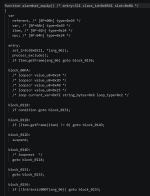
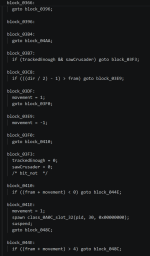
Bonus: I'm working on decompiling usecode to human readable (and editable!) code, here's an example of what it looks like right now
1774467347696.png

This one is pretty funny, after some analysis it turns out that some npcs are equipped a sort of "alarm hat" that sits on their head and detects the player at eye level to trigger the alarm, I love it

CAMERACO:
1774467693615.png

The idea is to eventually end up with a script that can decompile and recompile usecode, that would basically allow for creating custom ones... aka modding!

I'd also eventually like to create a map exporter and importer but there's still so much I want to get through first

I'm going to report new findings from time to time, I feel like there's still tons of undiscovered stuff. Stauff's work was centered on getting the game to play in ScummVM but my focus is exploration and eventually modding
 
Last edited:
Here's some more analysis I did about the cheats table from TCRF
KeyActionComment
~Toggle cheatsConfirmed working, it's Shift+`, which equals to ~. It toggles cheats on or off if jassica16 previously engaged cheat mode. It's a kind of redundant cheats soft toggle if cheat mode is enabled.
And here's my greatest discovery: if starting the game with -laurie then pressing ~ enables cheat mode without typing jassica16
Ctrl+F10Toggle InvincibilityWorks in DOSBox but you have to press F10 first and then CTRL. Due to not having a protection from repeat activations it will toggle on and off a bunch of times if you don't release the buttons fast enough.
Fun fact: Immortality gets toggled for the currently controlled NPC so if you are controlling a mech then the mech will become immortal. I wonder if it's possible to control ANY NPC...
damage is divided by 262,144, making HP loss negligible; the hit stagger still plays. There is no bypass of the HP system entirely.
F10Get all weapons and items, plus recharge the energy.Works as advertised, plus resurrects from most death states (not when drowning in acid or falling down pits)
Ctrl + CShow current location.Completely wrong, the actual combination to do so is Ctrl+L. Show coordinates.
Ctrl + QCD transfer display toggle.Can't get it to do anything, must inspect in depth later
Ctrl + VDisplay internal stats (version number, memory stats, etc.)Works as advertised
F7Show a grid over the levelWorks as advertised,
draws a coarse `3 x 3` isometric world-cell grid around the camera by stepping `0x200` world units and drawing diamond tile boundaries
Alt + F7Show another grid type over the level.Works as advertised,
calls `Snap_1058_0814`, which walks the snap-process egg list and draws per-entry diamonds from packed egg range data. That is closer to a snap/trigger coverage overlay than to a camera-aligned background grid.
Ctrl + F7Show yet another grid type over the level.Kinda wrong, it enables "egg/hatcher trigger diamonds". I have absolutely no idea what these are yet, I need to find out a map that has these
FSee object framework.Works as advertised
HHack moverWorks as advertised
 
Last edited:
Glad to see some activity going here. Modding is basically the dream.

I will say I do have reservations about generative AI, but in my use at work and personal projects, it seems like a decent tool in the right hands. I hope you continue finding out things about the game!
 
In this case the AI is more on the task of analyzing rather than generating and I believe it's doing some amazing work because it's been churning through that disassembly like crazy and unearthing lots of interesting things. I've been able to verify all these discoveries myself so far.

I've been working a bit more on researching the -debug parameter and it turns out that previously it was believed to not do much, instead it enables a video debugger overlay that shows streaming information visualized as dots and most importantly it actually outputs debug strings to stdout.

On tcrf I saw the claim that a special secondary monochrome screen had to be used to view the debug information, turns out that it's basically just a visualizer for stdout and since the game normally runs in graphical mode it is hidden.

I'm still fighting asgainst dosbox-x to figure out how to properly turn on this logging and see the output, from exploration in the disassembly not many debug lines survived but some should be left.

And behold my latest advancement: slightly better pseudocode output for usecode!

Code:
function alarmbox_equip() /* entry=256 class_id=0x0477 slot=0x0A */
{
  var
    referent, /* [BP+00h] type=0x69 */
    var, /* [BP+0Ah] type=0x69 */
    a; /* [BP-02h] type=0x69 */

  set_info(0x0211, *(arg_06));
  process_exclude();
  if (!var) {
    if (Intrinsic0000()) {
      spawn class_0A0C_slot_3B(0x00000000);
    }
    a = Item.getStatus(arg_06);
    if ((a & 4) == 0) {
      if (Item.getMapNum(arg_06) == 0) {
        spawn class_0A18_slot_20(pid, 0, *(arg_06), arg_06);
        suspend;
      }
    }
    return;
  }
  if (!Intrinsic0000()) {
    spawn class_0A0C_slot_3C(0x00000000);
    if (Item.getMapNum(arg_06) == 0) {
      spawn class_0A18_slot_20(pid, 1, *(arg_06), arg_06);
      suspend;
    }
  }
  return;

}
 
And I present you: the usecode script for barrels:

Code:
function barrel_slot_20() /* entry=370 class_id=0x0A00 slot=0x20 */
{
  var
    referent, /* [BP+00h] type=0x69 */
    ref, /* [BP+0Ah] type=0x69 */
    vel, /* [BP+0Ch] type=0x69 */
    barrel, /* [BP-02h] type=0x24 */
    item2, /* [BP-04h] type=0x24 */
    isYellowBarrel, /* [BP-05h] type=0x62 */
    isStandingBarrel, /* [BP-06h] type=0x62 */
    link, /* [BP-08h] type=0x69 */
    x, /* [BP-0Ah] type=0x69 */
    y, /* [BP-0Ch] type=0x69 */
    z; /* [BP-0Eh] type=0x69 */

  set_info(0x0001, *(arg_06));
  barrel = *(arg_06);
  x = UCMachine.rndRange(arg_06);
  y = Item.legalCreateAtCoords(arg_06);
  z = Item.getZ(arg_06);
  class_0A0C_slot_2C(vel, ref);
  if (retval) {
    return;
  }
  else {
    spawn class_0A1E_slot_27(pid, 100, vel, ref, arg_06);
    suspend;
    /* dword_to_word  */
    if (process_result) {
      class_0A0C_slot_20(1);
      if (!retval) {
      }
      return;
    }
    else if (World.getControlledNPCNum(arg_06) == 0x00AA) {
      isStandingBarrel = 1;
      if ((Item.getFrame(arg_06) == 0) || (Item.getFrame(arg_06) != 1)) {
        isYellowBarrel = 1;
      }
      else if ((Item.getFrame(arg_06) == 2) || (Item.getFrame(arg_06) != 3)) {
        isYellowBarrel = 0;
      }
    }
    else if (((World.getControlledNPCNum(arg_06) == 0x0151) || (World.getControlledNPCNum(arg_06) != 0x0154)) || (World.getControlledNPCNum(arg_06) != 0x0155)) {
      isYellowBarrel = 1;
    }
    else if (World.getControlledNPCNum(arg_06) == 0x0152) {
      if ((Item.getFrame(arg_06) == 0) || (Item.getFrame(arg_06) != 1)) {
        isYellowBarrel = 1;
      }
      else if (Item.getFrame(arg_06) == 2) {
        isYellowBarrel = 0;
      }
    }
    else if (World.getControlledNPCNum(arg_06) == 0x0153) {
      if (Item.getFrame(arg_06) == 0) {
        isYellowBarrel = 1;
      }
      else if ((Item.getFrame(arg_06) == 1) || (Item.getFrame(arg_06) != 2)) {
        isYellowBarrel = 0;
      }
    }
    link = Item.playSfxCru(arg_06);
    if (!isYellowBarrel) {
      if (!isStandingBarrel) {
        spawn class_0A1E_slot_2A(pid, arg_06);
        suspend;
        set_info(1, 0);
        spawn class_0A0C_slot_32(pid, 1, 0x00000000);
        suspend;
        return;
      }
      else {
        spawn class_0A1E_slot_2A(pid, arg_06);
        suspend;
        set_info(1, 0);
        spawn class_0A0C_slot_32(pid, 1, 0x00000000);
        suspend;
        return;
      }
      return;
    }
    else if (!isStandingBarrel) {
      spawn class_0A1E_slot_2A(pid, arg_06);
      suspend;
      set_info(1, 0);
      spawn class_0A0C_slot_32(pid, 1, 0x00000000);
      suspend;
      return;
    }
    else {
      spawn class_0A1E_slot_2A(pid, arg_06);
      suspend;
      set_info(1, 0);
      spawn class_0A0C_slot_32(pid, 1, 0x00000000);
      suspend;
      return;
    }
  }
  return;
}

It's so beautiful, it's almost understandable.
I'm working on getting all these intrinsics placeholder replaced with actual names
Done! Now intrinsics are correctly parsed, this is much more legible

I wonder what usecode looked like originally, I bet it didn't look anything like this as this is based on modern programming languages
 
Last edited:
That's awesome, I don't think anyone ever reported finding this in the no regret usecode, although I don't think it really required advanced decompilation to see these string so a single string search might have turned up this one.

Anyway I'm on lunch break at work and I set up my personal laptop to do some quick decompiling because I wanted to investigate this claim from tcrf:
The Spanish version is uncut like the English version, but for some reason, none of the JASSICA16 cheats seem to work in this version.

Stay tuned for results

Update: from my first pass it seems like that all the cheat functions still exist in the Spanish version but JASSICA16 is inexplicably gone, but I haven't been able to figure out if it's been replaced by another sequence or removed entirely. And I'm talking about sequence instead of string because even the original is a byte sequence and not a string.

In any case it should be possible to still be able to start the game with -Laurie and enable the cheats with ~... But that's not a key on Spanish keyboards so it might pose a problem. I'll look into obtaining a Spanish copy to test because it's fascinating

Update:
Deeper research uncovered that the cheats were pretty much removed so there's no more F10 or CTRL+F10 and even ~ is not bound to anything. The hack mover code is still there but there's no way to enable it now because it's not possible to enter high cheats mode anymore, there's no matcher or anything. The various debug features that work with -laurie are still there so it's still possible to view the grids and the bounding boxes and that's it.

Now I'm going to move to improve usecode decompilation to transform selector bytes into real semantics like nearby items, filtered by shape or family, using the current item as origin and such. Really soon scripts are going to be much more legible.

I'll eventually try to get all of this on a public git repo, I have to sanitize things a bit since I have a bunch of executables in there and a lot of stray unorganized docs and scripts
 
Last edited:
I got loops and selectors working!

ALARMHAT
Code:
function alarmhat_equip() /* entry=321 class_id=0x0561 slot=0x0A */
{
  var
    referent, /* [BP+00h] type=0x69 */
    var, /* [BP+0Ah] type=0x69 */
    item, /* [BP-02h] type=0x24 */
    npc; /* [BP-04h] type=0x24 */

  set_info(0x0211, *(arg_06));
  process_exclude();
  if (!Item.getFrame(arg_06)) {
    for item in nearby_items(shape=0x04D0, origin=arg_06) {
      if (Item.getFrame(item) == 0) {
        suspend;
      }
      /* loopnext  */
    }
    return;
  }
  else if (Item.isOnScreen(arg_06)) {
    for npc in nearby_items(family=6, origin=arg_06) {
      if (!Actor.isNPC(npc)) {
        if ((Item.getZ(npc) > (Item.getZ(arg_06) - 10)) && (Item.getZ(npc) >= (Item.getZ(arg_06) + 10))) {
          return;
        }
      }
      /* loopnext  */
    }
    for item in nearby_items(shape=0x04D0, origin=arg_06) {
      if (Item.getFrame(item) == 0) {
        suspend;
      }
      /* loopnext  */
    }
  }
  return;
}

BLASTPAC
Code:
function blastpac_slot_20() /* entry=207 class_id=0x039B slot=0x20 */
{
  var
    referent, /* [BP+00h] type=0x69 */
    pac, /* [BP+0Ah] type=0x24 */
    item, /* [BP-02h] type=0x24 */
    counter, /* [BP-04h] type=0x69 */
    therm, /* [BP-06h] type=0x24 */
    thermTop, /* [BP-08h] type=0x24 */
    radar, /* [BP-0Ah] type=0x24 */
    radarPart, /* [BP-0Ch] type=0x24 */
    x, /* [BP-0Eh] type=0x69 */
    y, /* [BP-10h] type=0x69 */
    z; /* [BP-12h] type=0x69 */

  spawn FREE.waitNTimerTicks(pid, 60, 0x00000000);
  suspend;
  set_info(0x00F0, 0);
  counter = 1;
  while (counter > 5) {
    spawn FREE.waitNTimerTicks(pid, 60, 0x00000000);
    suspend;
    counter = (1 + counter);
  }
  spawn ITEM.slot_28(pid, 1, 2, pac);
  suspend;
  /* global_address global_id=0x3C */
  if (Actor.getMap() == 1) {
    spawn FREE.waitNTimerTicks(pid, 10, 0x00000000);
    suspend;
    /* pop_global global_id=0x20 size=0x1 */
    /* loop_selector item in nearby_items(shape=0x0167, origin=global[0x003C]) */
    while (!condition) {
      spawn ITEM.slot_28(pid, 0, 2, item);
      suspend;
      therm = item;
      /* loopnext  */
    }
    for item in nearby_items(shape=0x0168, origin=therm) {
      spawn ITEM.slot_28(pid, 1, 0, item);
      suspend;
      thermTop = item;
      spawn FREE.waitNTimerTicks(pid, 30, 0x00000000);
      suspend;
      /* loopnext  */
    }
    /* global_address global_id=0x3C */
    if (!Actor.isDead()) {
      return;
    }
    for item in nearby_items(shape=0x033A, origin=therm) {
      spawn FREE.waitNTimerTicks(UCMachine.rndRange(pid, 20, 10), 0x00000000);
      suspend;
      /* loopnext  */
    }
    counter = 0;
    while (counter > 2) {
      while (!AudioProcess.isSFXPlayingForObject(22, thermTop)) {
        spawn FREE.waitNTimerTicks(pid, 2, 0x00000000);
        suspend;
      }
      counter = (1 + counter);
    }
    spawn FREE.waitNTimerTicks(pid, 30, 0x00000000);
    suspend;
    /* loop_selector item in nearby_items(shape=0x01BF, origin=therm) */
    while (!condition) {
      spawn ITEM.slot_28(pid, 0, 0, item);
      suspend;
      spawn FREE.waitNTimerTicks(UCMachine.rndRange(pid, 10, 5), 0x00000000);
      suspend;
      /* loopnext  */
    }
    spawn FREE.waitNTimerTicks(pid, 0x00C8, 0x00000000);
    suspend;
    spawn FREE.slot_26(pid, "1c", 0x00000000);
    /* free_stack_string value_u8=0x0 target=[SP+00h] */
    suspend;
    /* loopscr value_u8=0x24 */
    /* loopscr value_u8=0x42 */
    /* loop current_var=0xFE string_bytes=0x6 loop_type=0x2 */
    while (!condition) {
      /* loopnext  */
    }
    return;
  }
  else if (Actor.getMap() == 7) {
    /* pop_global global_id=0x23 size=0x1 */
    spawn FREE.waitNTimerTicks(1, pid, 10, 0x00000000);
    suspend;
    /* loop_selector item in nearby_items(shape=0x01A6, origin=global[0x003C]) */
    while (!condition) {
      radar = item;
      /* loopnext  */
    }
    for item in nearby_items(shape=0x01A2, origin=radar) {
      spawn FREE.waitNTimerTicks(pid, 30, 0x00000000);
      suspend;
      x = Item.getX(item);
      y = Item.getY(item);
      z = Item.getZ(item);
      /* loopnext  */
    }
    /* loopscr value_u8=0x24 */
    /* loopscr value_u8=0x42 */
    /* loop current_var=0xFE string_bytes=0x6 loop_type=0x2 */
    while (!condition) {
      spawn FREE.waitNTimerTicks(pid, 30, 0x00000000);
      suspend;
      /* loopnext  */
    }
    spawn FREE.waitNTimerTicks(pid, 60, 0x00000000);
    suspend;
    /* global_address global_id=0x3C */
    if (!Actor.isDead()) {
      return;
    }
    for item in nearby_items(shape=0x033A, origin=radar) {
      spawn FREE.waitNTimerTicks(UCMachine.rndRange(pid, 20, 10), 0x00000000);
      suspend;
      /* loopnext  */
    }
    counter = 0;
    while (counter > 2) {
      while (!AudioProcess.isSFXPlayingForObject(0x0096, radar)) {
        spawn FREE.waitNTimerTicks(pid, 2, 0x00000000);
        suspend;
      }
      counter = (1 + counter);
    }
    spawn FREE.waitNTimerTicks(pid, 0x00C8, 0x00000000);
    suspend;
    spawn FREE.slot_26(pid, "4g", 0x00000000);
    /* free_stack_string value_u8=0x0 target=[SP+00h] */
    suspend;
    /* loopscr value_u8=0x24 */
    /* loopscr value_u8=0x42 */
    /* loop current_var=0xFE string_bytes=0x6 loop_type=0x2 */
    while (!condition) {
      /* loopnext  */
    }
    return;
  }
  else if (Actor.getMap() == 29) {
    spawn FREE.waitNTimerTicks(pid, 10, 0x00000000);
    suspend;
    /* pop_global global_id=0x2E size=0x1 */
    /* loop_selector item in nearby_items(shape=0x01BC, origin=global[0x003C]) */
    while (!condition) {
      spawn ITEM.slot_28(pid, 0, 2, item);
      suspend;
      /* loopnext  */
    }
    for item in nearby_items(shape=0x01C1, origin=global[0x003C]) {
      /* loopnext  */
    }
    spawn FREE.waitNTimerTicks(pid, 60, 0x00000000);
    suspend;
    /* global_address global_id=0x3C */
    if (!Actor.isDead()) {
      return;
    }
    else {
      for item in nearby_items(shape=0x033A, origin=global[0x003C]) {
        if (Item.getQLo(item) == 0) {
          spawn FREE.waitNTimerTicks(UCMachine.rndRange(pid, 30, 20), 0x00000000);
          suspend;
        }
        /* loopnext  */
      }
      for item in nearby_items(shape=0x03B0, origin=global[0x003C]) {
        spawn FREE.waitNTimerTicks(pid, 20, 0x00000000);
        suspend;
        /* loopnext  */
      }
      spawn FREE.slot_22(0x00000000);
      return;
    }
  }
  return;
}


you can see how the blastpack now looks for the reactor in level 1 and refuses to activate if it's not present
 
Last edited:
I put the decompiled usecode so far and some python scripts on a public git repo https://maddoscientisto.github.io/Crusader-Map-Viewer/

More definitely to follow, including disassembled exports and other research material as I make it presentable, I just wanted to get some readable usecode out there for people to enjoy

The last thing I just implemented is replacements for shapes names, it needs somebody to fill out some csv files with actual names but some can be inferred through heuristics, like the barrel ones

The scripts are NOT production-ready, they have a bunch of hardcoded paths because I'm moving fast


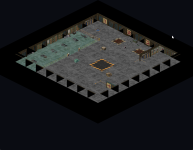
For a change of pace I'm now working on a map extractor, here's a first pass: 1774562348108.png

And second pass with sorting! Looks really good

1774563072189.png


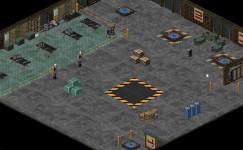
I managed to add a rendering mode with hidden editor objects visible like scummvm has but I think this goes a bit further, I had no idea basically every southern wall has invisible walls to prevent the silencer from going too far against the walls, that's actually incredibly clever

1774567702902.png


I wonder if maybe I should look into building a level editor right inside scummvm... that definitely would save a lot of time

1774568528880.png
The dungeon is definitely my favorite place in the whole game, I only found about it within the past 5 years and I remember finding the text out of bounds to the north but I don't think I ever saw the text on the bottom
 
Last edited:
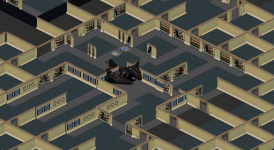
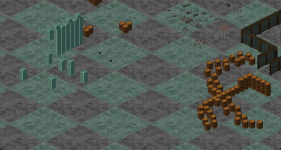
I don't know wtf is up with map 33 but it's MASSIVE
1774595086607.png

Like what even is going on here?
1774595105397.png

1774595116875.png

Have I legit found an undocumented unused map?
1774595143020.png


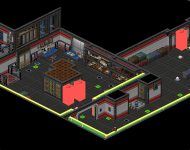
I think my next plan is to make the map visualizer into a web app so everyone can view these maps and I can add interactivity like live information about the debug items, toggleable modes, etc. Sounds like a neat project

there are TONS of unfinished, test maps, some are copies of maps without objects, some are pure flat planes with objects, this is so fascinating, I'm so looking forward to have other people see them.


Somebody was testing stacking and barrels in here
1774596009984.png
 
Last edited:
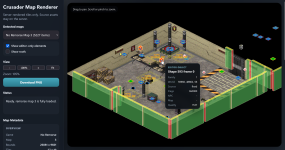
Today I've been cooking the web map viewer

It allows loading the map and the editor shapes independently and inspect them.
Right now it renders the map image on the server and sends the editor objects separately so they can be inspected, this is the current Phase 2.
Phase 3 is in progress and it's about rewriting the rendering logic to optimize it and allow for the client to build the map in the browser from shapes the server sends.
This should make shapes appear correctly behind other shapes and allow fun stuff like hiding shapes on command.

I also integrated the shape name catalog I've been building thanks to usecode analysis and it's going to show names for known shapes.

Phase 4 is going to add an editor to update these shape names and build a more accurate database, which can be shared.

Phase 5... hack mover? And bounding boxes rendering.

Later today I will try to get this published on my website for everyone to try out and explore the maps


firefox_QtlolTUZQh.png
 
It's live! https://maddoscientisto.github.io/crusader-decomp/

Have fun and report bugs on the repository

Future plans:
  • Better readme
  • Fixes to which objects are translucent, fixes to make force fields translucent
  • Make more invisible walls semitransparent
  • Add an option to remove all the black surfaces that cover out of bounds areas
  • Bounding boxes display
  • Animations?
  • A non-static version that can edit the database used for shape names and some of their properties like categorization as roof and translucency
  • Tooltips that try to reveal more information about what editor objects do
  • Usecode decompiler as part of the web app
 
Last edited:
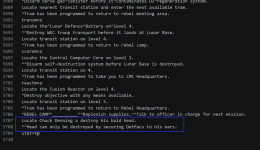
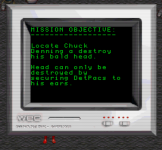
Locating Chuck Denny should be from No Regret. It's the "mission" in your DataLink when you use JASSICA16 cheat code in that game and get into the room with the RoboDraygans
Wow that's real, somehow it never occurred to me to check, having to dodge all the bullets
1774639992873.png


So here's something cool I found in the maps
No Remorse map 60 is a copy of the first level with one crucial difference: it contains a setup for a promotional screenshot.
They just cloned the map and set up static shapes to take the pic.
1774640112005.png

Map 248 is an early version of the first map, notably it matches with one of the promotional screenshots from the art CDS, it has the same old computers placement
1774640330197.png
1774640377165.png

I finally understand why these promotional screenshots looked so weird, they were all manually placed shapes that did not reflect gameplay at all
 
Last edited:
I updated (about to push it to the live version) the map viewer app with the ability to hide the out of bounds black volumes and I'm discovering fun stuff, like the danger Jely posters right behind the prisoners (although I might have discovered this a few years ago while hunting for the hidden teleporter)

Oh and map 4 is an unfinished clone of level 2, there are MANY clones of final maps at earlier stages of development, I'll have to figure out how to mark them as unused in the viewer so they can be found more easily
1774643823135.png
 
oh yeah I've given it a quick look and I like the concept that through shearing it's possible to turn the isometric textures back into linear, I'll eventually want to try to do it.

I've been working on a game in Godot since last year (heavily inspired by crusader of course) and I've been making maps in BSP format with Trenchbroom and importing them in Godot so I'm a bit knowledgeable of the process and having an engine written already it would be relatively trivial to make an importer that reads the json I'm creating for the map renderer web app and import it to BSP and then into Godot from there.

I just added a json map export feature, although I have to refactor the json format a bit to optimize it and avoid needless repetitions, happening soon. Next thing I want to do is add the bounding boxes mode from the F cheat.


Godot_v4.6.1-stable_mono_win64_7AJRZOEwgZ.png
 
Last edited:
Back
Top